In this post I will explain how VACUUM might obtain an AccessExclusiveLock on a table with a very specific layout due to truncation maintenance operations. Combining that behavior with the unexpected nature of AutoVacuum can create undesirable scenarios at the worst times.
Why autovacuum can unexpectedly take this lock
PostgreSQL autovacuum is a background process which performs maintenance operations on database tables. You can think of it as a job that starts running based on some heuristic (which can be configured) and executes the VACUUM command on a table.
My understanding was that VACUUM was safe to run online, that it wouldn’t cause any outage in production as it doesn’t acquire an AccessExclusiveLock. I frequently check this website to learn which locks are acquired by each PostgreSQL command. And it shows that plain VACUUM normally obtains a ShareUpdateExclusiveLock.
But there is one specific case where VACUUM (and consequently the autovacuum process too) will acquire an AccessExclusiveLock:
The standard form of VACUUM removes dead row versions in tables and indexes and marks the space available for future reuse. However, it will not return the space to the operating system, except in the special case where one or more pages at the end of a table become entirely free and an exclusive table lock can be easily obtained. docs ref
When VACUUM truncates empty pages
If you are deleting old records from a table, leaving empty pages (pages with only dead tuples) at the end of your table (physical position in disk), VACUUM will obtain an AccessExclusiveLock on that table, if it can obtain it immediately. It will then truncate those empty pages to free up some disk space.
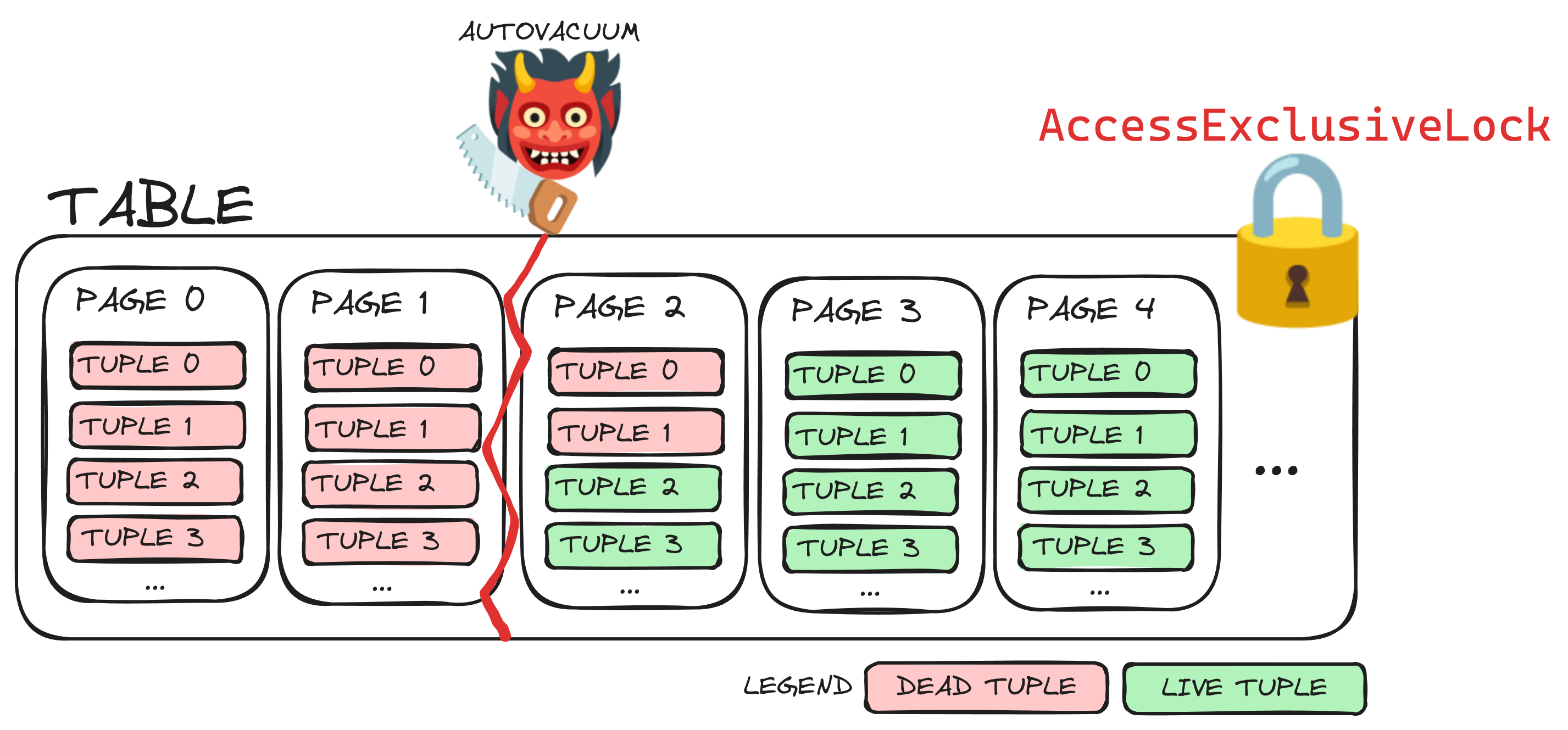
This is exactly what happened to me as we were running a job that was migrating old records to cold storage and deleting them afterward from the table. This generated the perfect scenario for AutoVacuum to lock the table for a while and cause a production outage.
Solutions
Preventing the lock with vacuum_truncate=false
Since PostgreSQL 12, it is possible to configure the VACUUM command to disable the truncation behavior by defining the following setting on a per-table basis:
ALTER TABLE
	my_table
SET
	vacuum_truncate=false,
	toast.vacuum_truncate=false;
If you are running VACUUM manually instead of AutoVacuum, you can parameterize the command itself:
VACUUM (TRUNCATE FALSE) my_table;
Although you will want to free up that disk space at some point. If you are still afraid of AccessExclusiveLock you can execute an online (concurrent) table rewrite with pg_repack.
Use TRUNCATE, if your data model allows it
Another solution is to execute the TRUNCATE command (instead of DELETE) when removing the data you are migrating. This will acquire an AccessExclusiveLock and free up disk space immediately.
This is not a drop-in replacement for DELETE, though. TRUNCATE removes all rows from a table (or from a partition, if you are truncating partitions), so this only makes sense if your data model lets you isolate old data cleanly. For example, old data could live in partitions, and then you can truncate whole old partitions instead of deleting millions of rows from the middle of a table.
I haven’t tried it yet in this exact setup, but it should be very fast to execute when the operation is scoped to an old partition or a temporary/staging table. The AccessExclusiveLock still exists, but it is explicit, predictable, and hopefully short-lived. In my case VACUUM started to truncate millions of rows as a side effect of a normal maintenance operation, which seems to have locked the table long enough to trigger our on-call monitors.
Community notes
It seems like this truncation shouldn't be a big problem in many setups, and some people have pointed out that this post might be exaggerated or too alarmist. However, there have been other responses explaining that when streaming replicas are in place, they might exacerbate the issue. The standby has to replay what happened on the primary. If replaying the truncation conflicts with queries running on the standby, it has to either delay WAL replay or cancel the conflicting queries.
Except if you have streaming replicas. The problem then is that replicas MUST replay the truncation, so either replication blocks or the replica needs to kill any blocking queries. Hot Standby Feedback does NOT do anything to alleviate this either.
When I encountered this years ago it was exacerbated by the use of read replicas. The vacuum process has no way of knowing that it's blocking a query on the read replica.
Once you know about this particularity of VACUUM, it is trivial to avoid it in the future. Interestingly enough, I had never heard about this specific behavior before, and my understanding was that VACUUM was "safe to run but doesn’t recover disk space" and VACUUM FULL was the heavy, dangerous, full-locking, version of it.
Turns out VACUUM can be dangerous too.